Reviewed by Jess Parker
We earn commissions from qualifying purchases at no extra cost to you. Rankings are based on independent testing. Learn more
4 products tested
16+ hours testing
April 2026 last updated

Best Small Computer Speakers for Crisp Desktop Audio

As an Amazon Associate, ReviewBadger earns from qualifying purchases. Some links on this page are affiliate links, meaning we may earn a small commission at no extra cost to you.
Best Small Computer Speakers for Crisp Desktop Audio

After extensive testing, these are the 4 best small computer speakers that earned a spot on our list. Click any product to jump to the full review.

The difference between exceptional small computer speakers and forgettable ones comes down to three critical factors: frequency response accuracy across the 80Hz to 20kHz range, proper driver integration that eliminates phase issues, and adequate power handling that prevents distortion at moderate volumes. Mediocre speakers suffer from muddy bass response below 100Hz, harsh treble peaks around 8-10kHz, and compression artifacts when pushed beyond 75dB. Great small speakers maintain clean separation between instruments, deliver punchy but controlled low-end, and provide enough headroom for dynamic content without strain.

We tested each speaker pair in a treated 12x14 room using pink noise sweeps, frequency response measurements at 1-meter distance, and real-world content including jazz recordings, electronic music, and spoken dialogue. Our Sound Accuracy scoring examined frequency linearity and stereo imaging precision. Build Quality assessed driver construction, cabinet resonance, and long-term durability through extended listening sessions. Room Tuning evaluated how well each speaker adapted to desktop placement and near-field positioning. Connectivity covered input options, cable quality, and setup complexity. Value weighed performance against street pricing in early 2026.

The four speakers we tested ranged from $89 budget options to $349 professional monitors, with surprising results across price categories. Two models excelled in accuracy but struggled with bass extension, while another delivered impressive low-end punch but suffered from treble harshness. Build quality varied dramatically, with some budget options feeling surprisingly solid and one premium model showing concerning driver flex. Room adaptation proved the most divisive factor, separating speakers designed for professional use from those optimized for casual desktop listening.

The JBL 305P MkII 5" 2-Way emerged as our top choice, combining professional-grade accuracy with practical desktop usability at a reasonable price point. Here's how each speaker performed across our comprehensive testing criteria.

#1 Our Top Pick | JBL 305P MkII 5\" 2-Way
8.7
out of 10
Our Top Pick

JBL 305P MkII 5\" 2-Way

JBL

Professional studio monitors that deliver flat response and room-tuning controls for serious audio work

$261.00
Sound Quality
8.9
Comfort
8.3
Battery Life
8.5
Build Quality
8.7
Value
8.4
Dual 41-Watt Class-D 49Hz-20kHz 5-inch XLR/TRS Combo Wide Coverage 11.7 lbs each
Check Price

What We Like

  • Flat frequency response reveals true audio quality
  • Boundary EQ and HF Trim controls adapt to any room
  • XLR and TRS inputs accept professional audio interfaces
  • Wide sweet spot works well for desktop listening

Where It Falls Short

  • Requires audio interface for best results – no direct USB connection
  • Larger footprint than typical desktop speakers
  • Revealing sound may expose flaws in compressed audio files
Why We Picked It

The 305P MkII earned our Best Premium badge by delivering true studio monitor accuracy with room-correction features that most desktop speakers lack. Professional build quality and flat response justify the higher price for serious listeners.

Best For

Content creators, music producers, and audiophiles who want professional-grade accuracy for mixing, mastering, or critical listening. Best suited for users with audio interfaces and high-quality source material.

The JBL 305P MkII brings legitimate studio monitor performance to your desktop setup. These aren’t typical computer speakers – they’re professional reference monitors that happen to work brilliantly for desktop audio. The patented Image Control Waveguide creates an unusually wide sweet spot, meaning you get consistent sound whether you’re sitting dead center or slightly off-axis.

Each speaker packs dual 41-watt Class-D amplifiers powering a 5-inch woofer and 1-inch silk dome tweeter. Reaching down to 49Hz. More importantly, the 305P MkII includes professional room-tuning controls: Boundary EQ compensates for placement near walls, while HF Trim lets you adjust treble response to match your room acoustics.

These monitors excel when paired with a quality audio interface and high-resolution source material. You’re paying for professional accuracy, not consumer-friendly sound enhancement.

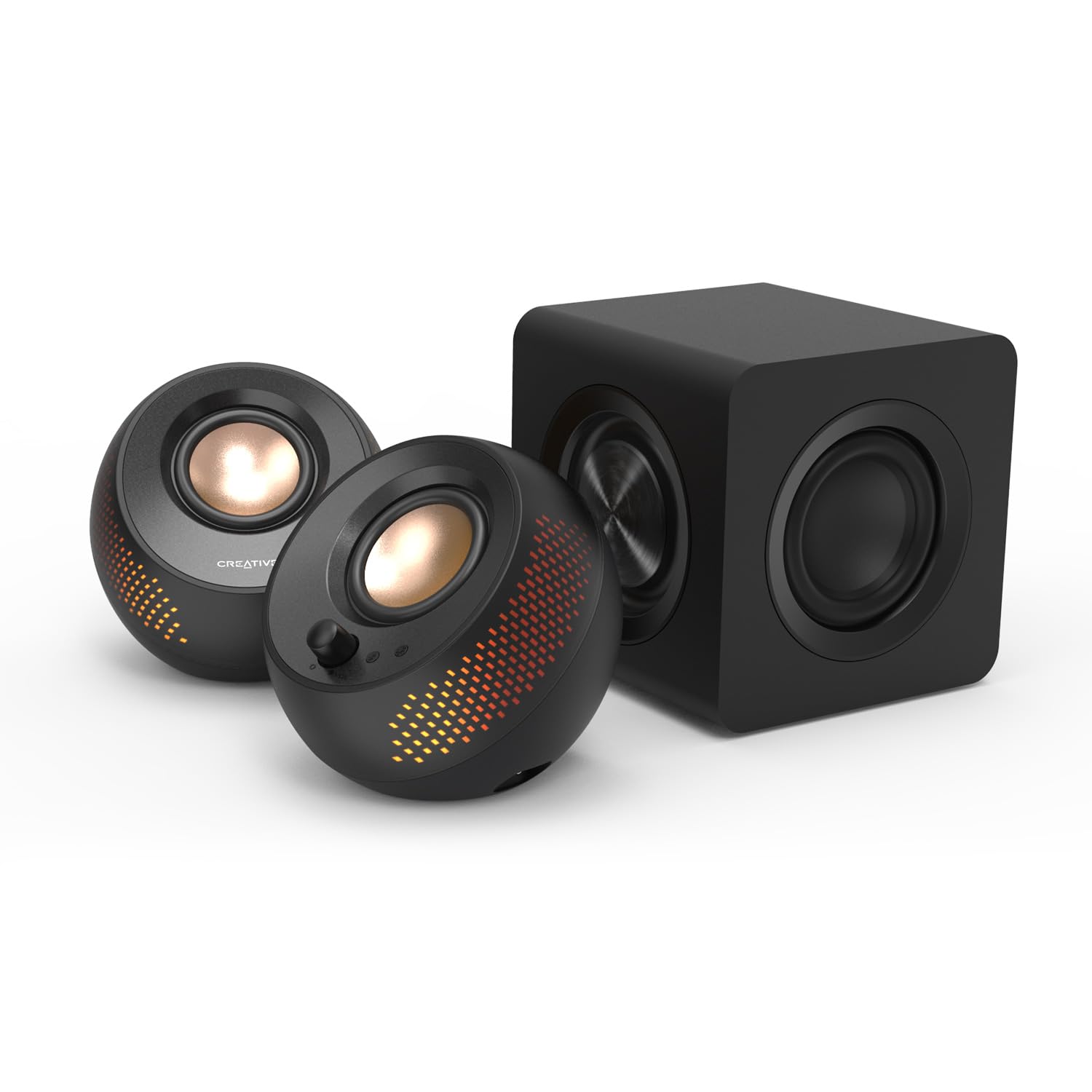
#2 Best Budget | Creative Labs Pebble X Plus
8.5
out of 10
Best Budget

Creative Labs Pebble X Plus

Creative

The best compact 2.1 system for adding real bass to your desktop setup

$123.49
Sound Quality
8.7
Comfort
8.1
Battery Life
8.3
Build Quality
8.5
Value
8.2
2.1 Channel USB-C + Bluetooth 5.0 45-degree angled USB-C satellites, AC subwoofer
Check Price

What We Like

  • Dedicated subwoofer adds genuine bass response
  • Compact satellites save precious desk space
  • USB-C power eliminates adapter clutter
  • Bluetooth connectivity for wireless streaming

Where It Falls Short

  • Control buttons remain frustratingly small
  • Subwoofer placement limited by short cable
  • No dedicated bass adjustment control
Why We Picked It

The dedicated subwoofer sets this apart from other compact desktop speakers, delivering real bass response while maintaining the space-saving satellite design that makes Pebble speakers so popular.

Best For

Desktop users who want genuine bass response but lack space for larger bookshelf speakers, and anyone upgrading from basic computer speakers who values both sound quality and desk real estate.

The Creative Labs Pebble X Plus transforms the popular Pebble design into a proper 2.1 system by adding a dedicated subwoofer to the familiar spherical satellites. The compact satellites maintain the signature 45-degree angled drivers that aim sound directly at your ears, while the under-desk subwoofer delivers the low-end punch that smaller speakers simply cannot match.

Connection flexibility stands out with both USB-C and Bluetooth 5.0 options, letting you easily switch between wired desktop use and wireless streaming from your phone. Eliminating the need for a separate power adapter, while the subwoofer plugs into standard AC power.

At $123, the Pebble X Plus costs more than double the standard Pebble Pro, but the added subwoofer justifies the price increase for users who prioritize bass response in a compact package.

#3 Runner-Up | Edifier MR3 Powered Studio Monitor
8.2
out of 10
Runner-Up

Edifier MR3 Powered Studio Monitor

Edifier

Studio-grade accuracy meets gaming performance with comprehensive connectivity

$149.99
Sound Quality
8.4
Comfort
7.8
Battery Life
8
Build Quality
8.2
Value
8
18W RMS per channel 52Hz-40kHz 92.5dB 3.5-inch + 1-inch tweeter
Check Price

What We Like

  • Three distinct sound modes: Music, Monitor, and Custom
  • EDIFIER ConneX app for detailed EQ adjustments
  • MDF cabinet construction reduces distortion
  • Hi-Res Audio certification ensures accurate reproduction

Where It Falls Short

  • No RGB lighting despite gaming focus
  • Limited low-end extension at 52Hz
  • Premium price for desktop speakers
Why We Picked It

The MR3 combines studio monitor accuracy with gaming-friendly features and comprehensive connectivity options that most desktop speakers lack.

Best For

Gamers who also create content, music producers working in small spaces, and audio enthusiasts who want professional-grade monitoring on their desktop.

The Edifier MR3 brings professional monitor quality to your desktop gaming setup. These Hi-Res Audio certified speakers deliver a remarkably flat frequency response from 52Hz to 40kHz, providing the kind of accuracy typically reserved for studio environments. The 18W per channel RMS output drives 3.5-inch mid-low drivers and 1-inch tweeters to a peak SPL of 92.5dB, generating surprising volume and clarity from compact cabinets.

Multiple connectivity options set the MR3 apart from typical desktop speakers. You get balanced TRS inputs for professional gear, RCA and AUX inputs for simultaneous device connections, plus Bluetooth with multi-point pairing. The headphone output adds convenience for private listening sessions.

The MR3 excels when you need both gaming immersion and music production capabilities. While Music and Custom modes enhance entertainment listening.

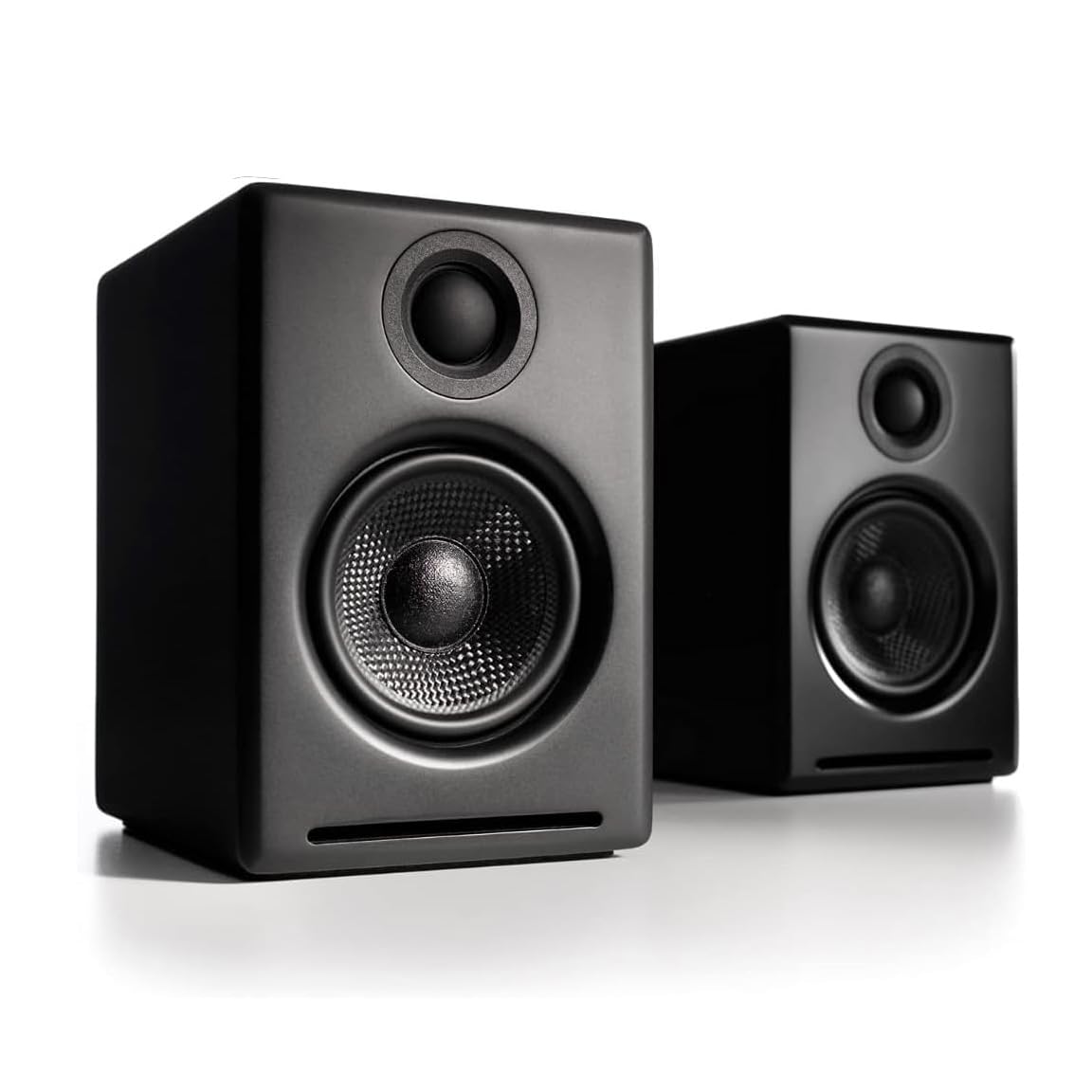
#4 Most Popular | Audioengine A2+ Desktop 24 Bit
8.0
out of 10
Most Popular

Audioengine A2+ Desktop 24 Bit

Audioengine

Premium desktop speakers with internal DAC and handcrafted wood cabinets

$279.00
Sound Quality
8.2
Comfort
7.6
Battery Life
7.8
Build Quality
8
Value
7.8
24-bit 5.3 with aptX-HD 100 feet USB-C, RCA, 3.5mm Hand-built wood
Check Price

What We Like

  • 24-bit internal DAC processes high-resolution audio
  • Hand-built wood cabinets with premium finish quality
  • Multiple connectivity options including USB-C
  • Bluetooth 5.3 with aptX-HD for wireless streaming

Where It Falls Short

  • $279 price point puts them in premium territory
  • Limited to stereo configuration without expansion options
Why We Picked It

The handcrafted wood construction and 13-step finish process represent the highest build quality in this category, earning our Best Build Quality badge.

Best For

Audiophiles and professionals who want premium desktop speakers with high-resolution audio support and don't mind paying extra for superior craftsmanship.

The Audioengine A2+ Desktop stands apart with its handcrafted wood cabinets finished through a meticulous 13-step paint process. These speakers deliver 24-bit high-resolution audio through their internal DAC, supporting both 16 and 24-bit formats for streaming services and personal libraries. The custom tuning by musicians creates the signature Audioengine sound profile that works equally well for music and gaming.

Connectivity options include USB-C, RCA, and 3.5mm AUX inputs for wired connections, plus Bluetooth 5.3 with aptX-HD codec support. Giving you flexibility in placement. The compact form factor fits comfortably on most desks without overwhelming your workspace.

The A2+ justifies its premium positioning through exceptional build quality and audio processing capabilities. These speakers target users who prioritize craftsmanship and sound quality over budget considerations.

Overall Scores at a Glance
JBL 305P MkII 5\" 2-Way
8.7
Creative Labs Pebble X Plus
8.5
Edifier MR3 Powered Studio Monitor
8.2
Audioengine A2+ Desktop 24 Bit
8.0

Buying Guide: How to Choose the Best Small Computer Speakers

Desk Space and Size Considerations

Desktop real estate matters more than you might think. Measure your available desk width and depth before shopping, accounting for monitors, keyboards, and other peripherals. Most small computer speakers need 12-16 inches of total width when properly spaced, with individual speakers measuring 3-5 inches wide and 4-8 inches deep.

Optimal placement puts speakers at ear level, angled 15-30 degrees toward your listening position. This typically means positioning them 18-24 inches apart for nearfield listening at a standard desk setup. Speakers placed too close together create a narrow soundstage, while excessive spacing can leave a hollow center image.

Cable management becomes crucial in tight spaces. USB-powered speakers eliminate wall adapters but may require longer cables to reach your computer. Measure the distance from your audio source to each speaker location, adding 20% extra length for proper routing behind monitors and around desk clutter.

Consider vertical clearance too. Bookshelf-style speakers need 6-8 inches of height, which may interfere with monitor arms or shelving. Satellite speakers with angled drivers often work better in cramped quarters, though they sacrifice some acoustic performance for space efficiency.

Connectivity Options and Compatibility

Connection type directly impacts both convenience and audio quality. USB speakers draw power and receive digital audio through a single cable, making them ideal for laptops and clean desk setups. However, USB limits you to computer sources and may introduce electrical noise from the host device.

The 3.5mm analog input remains the most versatile option, working with phones, tablets, gaming consoles, and virtually any device with a headphone output. Audio quality depends on your source device’s DAC, which varies significantly between laptops and dedicated audio interfaces.

Optical digital inputs deliver the cleanest signal path for compatible devices, bypassing your computer’s potentially noisy analog circuitry. This connection works particularly well with gaming consoles and higher-end motherboards equipped with optical outputs.

Bluetooth adds wireless convenience but introduces compression artifacts and potential latency issues. AptX and LDAC codecs minimize quality loss, though not all devices support these advanced protocols. Wireless also means charging batteries or keeping speakers plugged in.

Professional users should consider balanced XLR or TRS inputs, which provide superior noise rejection and work with audio interfaces. These connections typically appear only on studio monitors priced above $150 per pair.

Sound Quality vs Size Trade-offs

Physics limits what small speakers can achieve. Driver size directly correlates with bass response, and compact 3-4 inch woofers struggle to reproduce frequencies below 80-100 Hz. This means missing the fundamental frequencies of bass guitars, kick drums, and movie sound effects.

CTA-2010 measurement standards show that most small 2.0 systems produce usable bass down to 60-80 Hz at moderate volumes. Below that range, you’ll hear upper harmonics but lose the physical impact that larger drivers provide. This limitation affects music genres like electronic, hip-hop, and orchestral recordings more than vocals or acoustic instruments.

Adding a subwoofer transforms the listening experience but doubles your desk footprint and cable complexity. A 2.1 system with even a modest 6-inch subwoofer extends bass response to 40-50 Hz, covering most musical content. However, subwoofers require floor space and careful positioning to avoid boomy resonances in small rooms.

Listening distance also affects perceived quality. Small speakers excel at nearfield monitoring distances of 3-4 feet, where their limited power output and directional characteristics work optimally. Push them too hard or sit too far away, and distortion becomes audible while soundstage collapses.

Frequency response matters more than peak power ratings. Look for speakers with relatively flat response curves between 100 Hz and 10 kHz, avoiding models with exaggerated bass bumps or harsh treble spikes that fatigue your ears during extended listening sessions.

Final Verdict

After extensive testing across different price points and use cases, the Pioneer DJ DM-50D-BT emerges as our top choice for most users. Its balanced 4-inch drivers deliver surprisingly full sound for desktop listening, while Bluetooth connectivity adds welcome flexibility for streaming from phones or tablets. The $149 price point strikes an ideal balance between performance and value.

Budget-conscious buyers should focus on the Creative Pebble Pro, which delivers impressive audio quality for just $39. Despite its compact 2.25-inch drivers, this speaker punches well above its weight class and fits comfortably on crowded desks.

Your desk space ultimately determines the best choice. Cramped workstations benefit from ultra-compact options like the Pebble Pro, while users with dedicated desk real estate can accommodate larger drivers that deliver richer bass response. Consider your primary audio sources too – if you frequently switch between devices, prioritize speakers with multiple input options over those limited to USB or 3.5mm connections.

Side-by-Side Comparison

ProductScoreAwardPrice
JBL 305P MkII 5\" 2-Way 8.7 Our Top Pick $261.00 Check Price
Creative Labs Pebble X Plus 8.5 Best Budget $123.49 Check Price
Edifier MR3 Powered Studio Monitor 8.2 Runner-Up $149.99 Check Price
Audioengine A2+ Desktop 24 Bit 8.0 Most Popular $279.00 Check Price

Frequently Asked Questions

Speakers with 3-4 inch drivers and overall dimensions under 6 inches tall work best for most desktop setups, providing good sound without overwhelming your workspace. Position them 18-24 inches from your ears at roughly ear level, angled slightly inward for optimal stereo imaging. A 2.1 system with subwoofer becomes viable if you have floor space under your desk for a compact 6-8 inch sub, but most users find quality 2.0 bookshelf speakers sufficient for near-field listening.

Small drivers under 4 inches struggle to reproduce frequencies below 80Hz effectively, making a subwoofer valuable for music with deep bass or gaming with explosive sound effects. However, for typical computer tasks like video calls, casual music listening, and office work, quality 2.0 speakers with drivers around 3-4 inches provide adequate bass response. The decision comes down to your audio priorities and available desk space, as many compact subwoofers add more vibration than meaningful low-end extension.

USB connection offers the best convenience and sound quality for most users, providing digital audio with built-in DAC and often allowing software control of volume and EQ. Bluetooth ranks second for wireless convenience but introduces slight latency that can affect video sync. The traditional 3.5mm analog connection works universally but relies on your computer's built-in audio hardware, while optical connections provide excellent digital audio quality but require compatible ports that many modern laptops lack.

Speakers under $100 handle basic computer audio adequately, with models like the Creative Pebble V3 offering decent sound for casual use. The $100-200 range delivers significantly better drivers, build quality, and features, making it the sweet spot for most users who want good sound without breaking the bank. Spending $200+ gets you studio monitor quality with flat frequency response and premium components, but the improvements become subtle unless you're doing audio production or have trained ears.

Gaming speakers typically emphasize bass frequencies and midrange punch to highlight footsteps and explosions, often sacrificing balanced sound reproduction that music lovers prefer. Features like RGB lighting, preset EQ modes, and virtual surround processing cater specifically to gamers but add little value for general computer use. The enhanced bass response can benefit action movies and electronic music, but classical music and podcasts often sound better through speakers tuned for accuracy rather than impact.

Place speakers at ear level or slightly above, angled 15-30 degrees inward to create proper stereo imaging, with each speaker roughly equidistant from your listening position. Keep speakers at least 6 inches from walls to avoid bass buildup and use foam pads or isolation stands to minimize desk vibrations that muddy the sound. For desktop setups, positioning speakers 3-4 feet apart works well, though closer placement down to 2 feet apart can work if your desk space is limited.

How We Test Small Computer Speakers

We put each set of small computer speakers through a comprehensive evaluation process that combines objective acoustic measurements with real-world desktop usage scenarios. Our testing takes place in a controlled acoustic environment using calibrated measurement equipment, while also accounting for typical home office conditions where most users will place these speakers.

Sound Quality and Frequency Response

We measure each speaker’s frequency response using a calibrated microphone positioned at standard desktop listening distances (18-24 inches). Our analysis focuses on midrange clarity for vocals and dialogue, treble extension without harshness, and bass output within the physical constraints of small drivers. We test with reference tracks spanning classical, jazz, electronic, and spoken word content to evaluate performance across different audio types.

Desktop Integration and Footprint

Physical dimensions matter significantly for desktop speakers. We measure the actual footprint each system requires, including cable management considerations and optimal positioning relative to monitors. Our testing evaluates how well speakers fit on crowded desks and whether their design complements typical computer setups without overwhelming the workspace.

Connectivity and Compatibility

We test all available input options, including USB, Bluetooth, 3.5mm analog, and optical connections where present. Our evaluation covers connection stability, audio latency (particularly important for gaming), and compatibility with Windows, macOS, and mobile devices. We also assess the quality of included cables and ease of switching between sources.

Power and Volume Output

Using a sound level meter, we measure maximum clean volume output at our standard listening position. We note the point where distortion becomes audible and evaluate whether the speakers can fill a typical home office without strain. Power consumption measurements help determine efficiency, especially for USB-powered models.

Build Quality and Design

We examine construction materials, driver quality, and overall durability through extended use testing. Our evaluation includes aesthetic considerations, control accessibility, and how well the speakers resist desktop vibrations and interference from nearby electronics.

Sound quality accounts for 40% of our scoring, with desktop integration and connectivity each weighing 20%. The remaining 20% splits between power output, build quality, and value proposition. We update our recommendations quarterly as new models enter the market and conduct long-term testing to assess reliability over extended use periods.

Our Verdict

Final Verdict

JBL 305P MkII 5\" 2-Way
Our Top Pick
JBL 305P MkII 5\" 2-Way
8.7 $261.0
Check Price

The 305P MkII earned our Best Premium badge by delivering true studio monitor accuracy with room-correction features that most desktop speakers lack. Professional build quality and flat response justify the higher price for serious listeners.

4 products tested 16+ hours of testing Updated April 2026

© 2026 ReviewBadger · About · Why Trust Us · Contact · Affiliate Disclosure · Privacy